
About battery health management in Mac laptops
Mac laptop batteries use lithium-ion technology. Lithium-ion batteries charge quickly, are long-lasting, and currently provide the best technology to power your computer.
All rechargeable batteries are consumable components that become less effective as they get older—and their age isn't determined only by time. A battery's lifespan depends on its chemical age, which is affected by factors such as its temperature history and charging pattern. As your laptop's battery ages chemically, its charging capacity gets smaller.
Battery health management is on by default when you buy a new Mac laptop with macOS 10.15.5 or later, or after you upgrade to macOS 10.15.5 or later on a Mac laptop with Thunderbolt 3 ports.
If you want to turn off battery health management on a Mac laptop with an Intel processor, follow these steps:
Choose System Settings (or Preferences) from the Apple menu .
Click Battery in the sidebar.
Click Battery Health.
Deselect "Manage battery longevity".
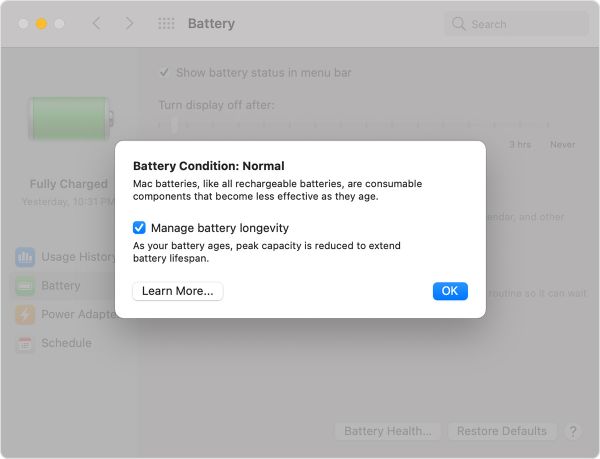
Click Turn Off.
Click OK.
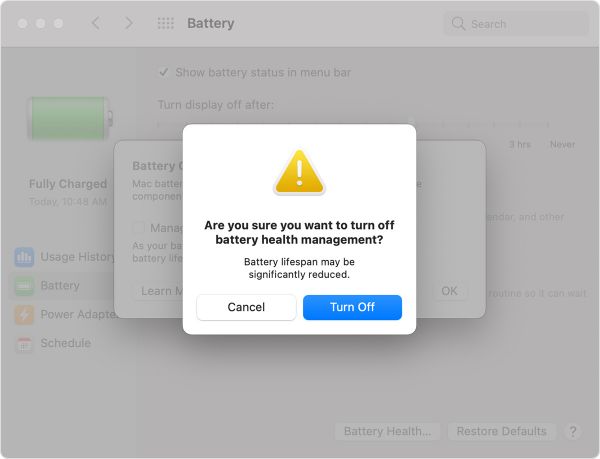
Note that turning this feature off might reduce your battery's lifespan.
The battery health management feature in macOS 10.15.5 monitors your battery's temperature history and its charging patterns, improving your battery's lifespan by reducing the rate at which it chemically ages.
Based on the measurements that it collects, battery health management may reduce your battery's maximum charge when in this mode. This happens as needed to ensure that your battery charges to a level that's optimized for your usage—reducing wear on the battery, and slowing its chemical aging. Battery health management also uses the measurements to calculate when your battery needs service.
While battery health management benefits your battery's long-term lifespan, it can also reduce the amount of time your Mac runs on one battery charge when capacity limits are applied. If your priority is making your Mac laptop last as long as possible before recharging, you can turn the feature off.
When battery health management is turned on, your battery's maximum charging capacity might be limited. Although the feature is designed to improve your battery's lifespan, the limited maximum capacity might update your battery status menu to indicate a need for service. Your Mac calculates when to recommend service for your battery based on battery health management being continuously enabled.
Maximizing battery life and lifespan
Get service for your Mac laptop.
Published Date: April 03, 2025
相关知识
Caring for your battery in Windows
Battery Health Center
Battery Health Mac
Battery Health 3 Mac
About Chronic Disease Management in NJ
iPhone battery and performance
What Is the Purpose of a Battery Management System (BMS)?
Battery Health
Chronic Disease Management in Omaha, Fremont, Lincoln
Sustainable Pest Management for Health and Well
网址: About battery health management in Mac laptops https://www.trfsz.com/newsview1701911.html
推荐资讯




- 1发朋友圈对老公彻底失望的心情 12775
- 2BMI体重指数计算公式是什么 11235
- 3补肾吃什么 补肾最佳食物推荐 11199
- 4性生活姿势有哪些 盘点夫妻性 10428
- 5BMI正常值范围一般是多少? 10137
- 6在线基础代谢率(BMR)计算 9652
- 7一边做饭一边躁狂怎么办 9138
- 8从出汗看健康 出汗透露你的健 9063
- 9早上怎么喝水最健康? 8613
- 10五大原因危害女性健康 如何保 7828