
Charge the iPod touch battery
Modifying this control will update this page automatically
iPod touch has an internal, lithium-ion rechargeable battery, which currently provides the best performance for your device. Compared with traditional battery technology, lithium-ion batteries are lighter, charge faster, last longer, and have a higher power density for more battery life. To understand how your battery works so you can get the most out of it, see the Apple Lithium-ion Batteries website.
About charging the battery

The battery icon in the top-right corner shows the battery level or charging status. When you’re syncing or using iPod touch, it may take longer to charge the battery.
If iPod touch is very low on power, it may display an image of a nearly depleted battery, indicating that it needs to charge for up to 10 minutes before you can use it. If iPod touch is extremely low on power when you begin to charge it, the display may be blank for up to 2 minutes before the low-battery image appears. See the Apple Support article If your iPhone or iPod touch won’t charge.
Charge the battery
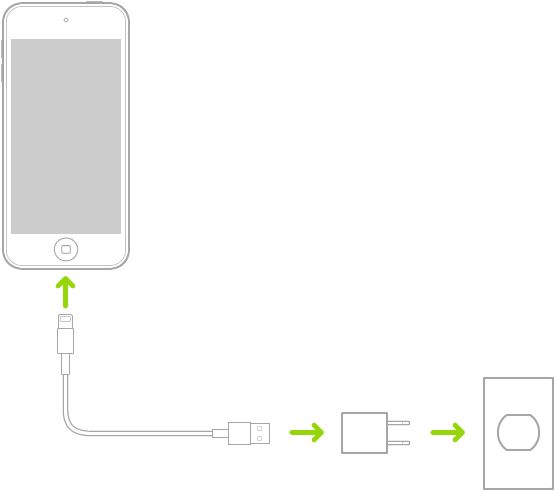
To charge your iPod touch battery, do one of the following:
Connect iPod touch to a power outlet using the included charging cable and a compatible power adapter (sold separately). See Accessories for charging iPod touch.
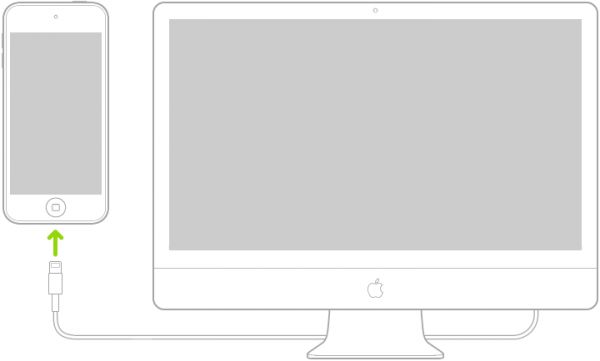
Connect iPod touch and your computer with a cable. Make sure your computer is turned on—if iPod touch is connected to a computer that’s turned off, the battery may drain instead of charge. Look for  on the battery icon to make sure your iPod touch is charging.
Note: Don’t try to charge your iPod touch by connecting it to your keyboard, unless your keyboard has a high-power USB port.
WARNING: If you suspect there may be liquid in the charging port of iPod touch, don’t plug the charging cable into it. For information about exposure to liquid, and other important safety information about the battery and charging iPod touch, see Important safety information for iPod touch.
Turn on Low Power Mode
Using Low Power Mode can significantly increase the life of the battery charge. Switch to Low Power Mode when your iPod touch battery is low, or when you don’t have access to electrical power.
Go to Settings  > Battery.
Turn on Low Power Mode.
Low Power Mode limits background activity and optimizes performance for essential tasks like making and receiving calls, email, and messages; accessing the internet; and more.
Note: If your iPod touch switches to Low Power Mode automatically, it switches back to normal power mode after charging to 80%. Your iPod touch might perform some tasks more slowly when in Low Power Mode.
Battery life and charge cycles vary with use and settings. The iPod touch battery should be serviced or recycled by Apple or an Apple Authorized Service Provider. See the Battery Service and Recycling website.
Please don’t include any personal information in your comment.
Maximum character limit is 250.
Thanks for your feedback.
相关知识
Is iPhone or iPod Battery Replacement Worth It?
Apple iPod Touch 4th Generation Review
When to charge your iPhone or iPad
Battery Health ™ IPA Cracked for iOS Free Download
AppleCare+ for iPhone, iPad, iPod and Apple Watch Now Covers Batteries That Retain Less Than 80% of Original Capacity
What Is the Purpose of a Battery Management System (BMS)?
Fifth Generation iPod (iPod with video) 30 GB, 60 GB
检查 iPod touch 电池用量
给 iPod touch 电池充电和监控电池
显示 iPod touch 电池百分比
网址: Charge the iPod touch battery https://www.trfsz.com/newsview1620421.html
推荐资讯




- 1发朋友圈对老公彻底失望的心情 12775
- 2BMI体重指数计算公式是什么 11235
- 3补肾吃什么 补肾最佳食物推荐 11199
- 4性生活姿势有哪些 盘点夫妻性 10428
- 5BMI正常值范围一般是多少? 10137
- 6在线基础代谢率(BMR)计算 9652
- 7一边做饭一边躁狂怎么办 9138
- 8从出汗看健康 出汗透露你的健 9063
- 9早上怎么喝水最健康? 8613
- 10五大原因危害女性健康 如何保 7828